

Read in 简体中文
我是钢铁侠的忠实粉丝,一直对前沿技术充满热情。既然造不出真正的战甲,我决定退而求其次,打造自己的 JARVIS——Just A Rather Very Intelligent System,一个相当非常智能的系统。
长远的愿景是把所有工具无缝整合成一个统一的 AI 系统。但这极其复杂,所以我决定先把每个功能做成独立的 App,整合的事之后再说。
以下是我目前做的两个 App:它们是什么、为什么做、以及它们如何改变了我的日常。
Antony’s Super Rider —— 用手表叫滴滴
本 App 与滴滴官方无关。
为什么做它
暑假期间,我几乎每天都去健身房和游泳馆。每次出门都需要叫两辆滴滴——去程一辆,回程一辆。
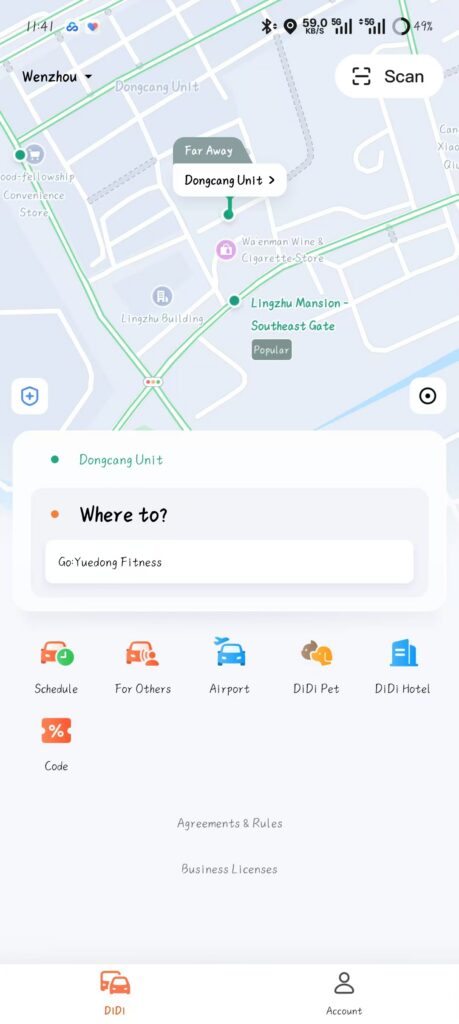
滴滴的英文界面其实挺清爽,内容不杂,叫车也算顺畅,尤其是它会自动推荐上车点和目的地。但由于我使用频率太高,那些零碎的摩擦感就变得越来越烦躁。
我讨厌一次次打开 App 查看司机信息;讨厌从口袋里掏手机;讨厌在手机上找 App;也讨厌等它慢慢加载——我的手机很慢。
这个 App 做了什么
Antony’s Super Rider 让你直接在手腕上快速发起滴滴订单。
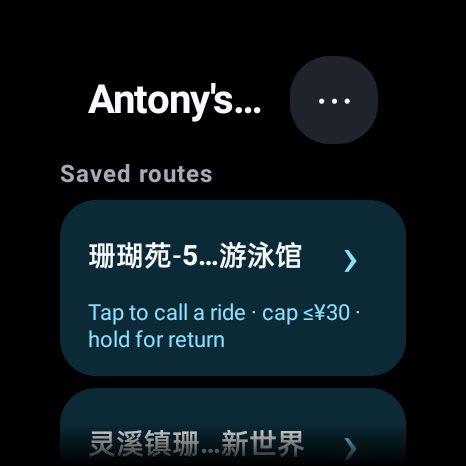
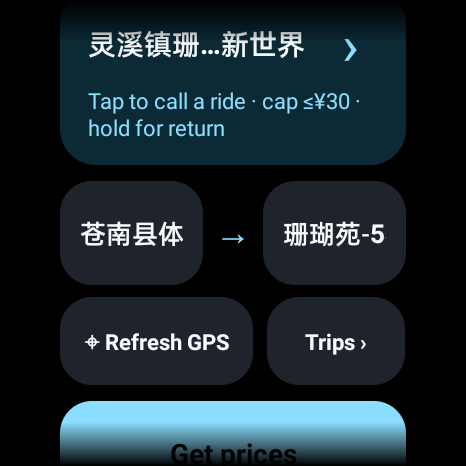
为了最大程度的便捷,你可以设置常用路线(从 A 到 B)。这些路线会显示在主页顶部,点一下就能叫车。如果要叫返程(从 B 到 A),长按路线即可。
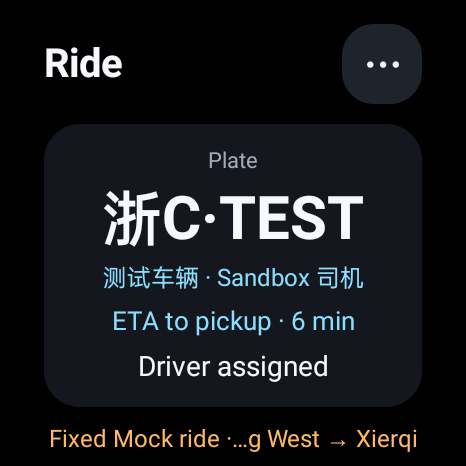
下单后,App 自动追踪订单状态,向你展示司机和车辆信息、预计到达时间等。所有信息在表盘上点一下就能看到,一览无余。
如果需要临时选择起终点,也可以手动操作。你的家和常用地点可以快速选取,省去重复输入的麻烦。
它如何改变了我的生活
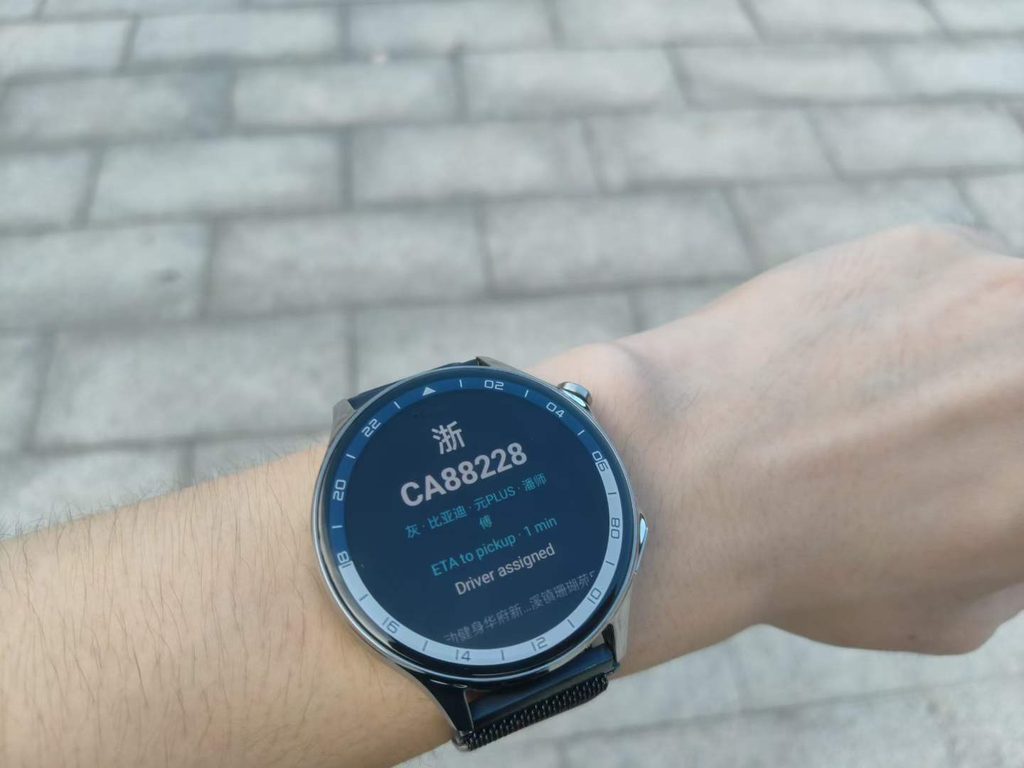
我自己这段时间一直在用这个 App,它真的解放了我的双手——大多数情况下,我出门叫车完全不需要手机了。尤其是当我想出门跑步、又不想带手机的时候,这一点格外有用。
Antony’s Super Midea —— 用手表控制空调
为什么做它
在家,我一直用美的 App 控制卧室的空调,很方便。但”方便”的前提是手机得在手边——充电中、或者任何拿不到手机的情况下,就只能干着急。
我需要的是另一个控制终端,而手表是最顺手的选择。
这个 App 做了什么
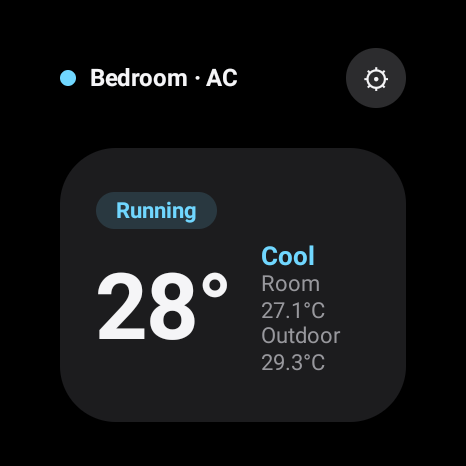
主页展示你已接入的美的设备列表,以及每台设备的基本状态信息。
点进空调,是一个直观的控制界面:
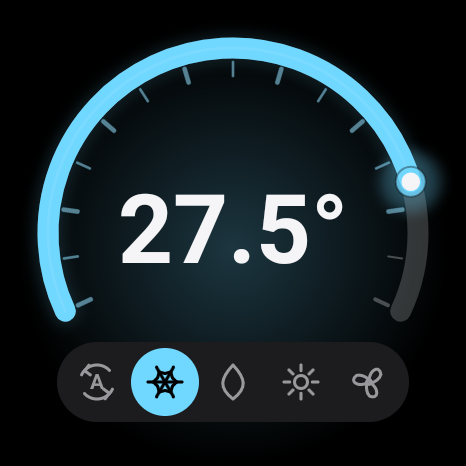
- 点击中心:开关机
- 滑动条:设定目标温度
- 底部状态栏:切换模式——自动、制冷、制热、送风等
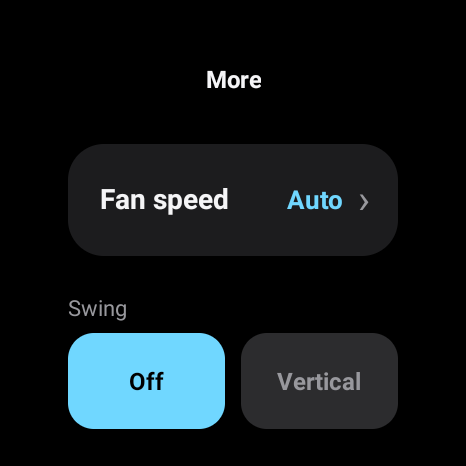
如果需要更多设置,长按中心进入”更多”页面,可以调节显示、扫风方向、风速等选项。
目前的状态
这个 App 刚刚开发完成,我还没有太多使用经验——但我相信它很快就会成为日常不可或缺的一部分。
接下来
这只是两块砖。最终目标是把所有功能整合在一起——一个理解我的上下文、跨服务替我行动的统一系统。
那才是真正的 JARVIS。而这两个 App,是它的起点。
I’m a fan of Iron Man, and I’ve always been drawn to frontier technology. Since building an actual Iron Man suit isn’t exactly on the table, I decided to build the next best thing: my own JARVIS — Just A Rather Very Intelligent System.
The long-term vision is for all of these tools to be seamlessly integrated into one unified AI system. But that’s an enormously complex undertaking, so I decided to build each app individually first, and worry about the integration later.
Here’s what I’ve built so far, why I built them, and how they’ve changed my daily life.
Antony’s Super Rider — DiDi on Your Wrist
Not affiliated with DiDi.
Why I Built It
During the summer holiday, I constantly go to the gym and the swimming pool. Every time I head out, I need two DiDi rides — one to get there, one to get back home.
DiDi’s English interface is actually pretty clean. There isn’t much clutter, and you can usually get a ride without too much trouble, especially with automatic pickup and destination suggestions. But given how frequently I use it, the friction adds up fast.
I hate having to open the app over and over to check on my driver. I hate taking my phone out of my pocket. I hate hunting for the app on my phone. And I hate waiting for it to load — my phone is rather slow.
What It Does
Antony’s Super Rider lets you initiate a DiDi order quickly from your wrist.
For maximum convenience, you can set Saved Routes (from A to B). These appear at the top of the home screen, so you can call a ride with just one tap. To call the return trip (B to A), simply long-press the route.
Once your ride is booked, the app tracks it for you — showing driver and car information, ETA, and more. All of it is visible at a glance, with a single tap on the watch face.
You can also manually select a pickup location and destination when needed. Your Home and Favorite Locations are available as quick-select options to speed this up.
How It’s Changed My Life
I’ve been using this app myself, and it has literally freed my hands — in most cases, I no longer need my phone at all. This is especially useful when I want to go out for a run and don’t want to bring my phone with me.
Antony’s Super Midea — AC Control on Your Wrist
Why I Built It
At home, I control my bedroom’s AC through the Midea app. It works great — except when my phone is charging, or whenever I just can’t reach it. I needed a second device to control the AC from, and my watch was the obvious answer.
What It Does
The home screen shows a list of your connected Midea devices along with their basic status information.
Tapping into your AC brings up an intuitive control interface:
- Tap the center to toggle power on/off
- Slider to set the target temperature
- Status bar at the bottom to switch between modes: Auto, Cool, Heat, Fan, and more
For additional settings, long-press the center to open a “More” page where you can adjust things like display, swing direction, and fan speed.
Where Things Stand
This app is freshly built and I haven’t had much chance to use it yet — but I fully expect it to make itself indispensable very soon.
What’s Next
These are just the first two pieces. Eventually, the goal is to bring everything together — a unified system that understands my context and acts on my behalf across all the services I use.
That’s JARVIS. These are its first building blocks.
Leave a Reply